

As of February 2026 in the version 26.2 update, Dentrix has decided to Sunset/End-Life of the long Standing 26-years of Dentrix/Dexis integration solutions. Henry Schein One has chosen to invoke control over the Dentrix Chart integration by means their newly unified solution; it is an in-house design called Dentrix Imaging. As a result of this business decision. This Documents goal is to educate you on what this update entails, how we can best prepare, and implement it moving forward so they we will prevent any operational disruptions.
What to know:
- Why did HenryScheinOne Sunset Dexis integration?
- No official Statement has been made, but one can deduce that with their new in house imaging solution, the plan is to eventually migrate Dentrix users into that.
- Was there any prior Notification?
- No, HenryScheinOne did not provide adequate notification, the only notation was in the Change Log notes after auto update.
- What were the 26.2 Changelog notes:
- “Access Dexis Through Dentrix Imaging. Beginning with Dentrix 26.2, the Dexis Integrator has been removed from the Chart. Instead, use the Dentrix Imaging panel to access your images.”
- What Breaks?
- The February 26.2 update once ran, removed the Dexis imaging tab from the Dentrix Chart, replacing it with a Generic Imaging tab.
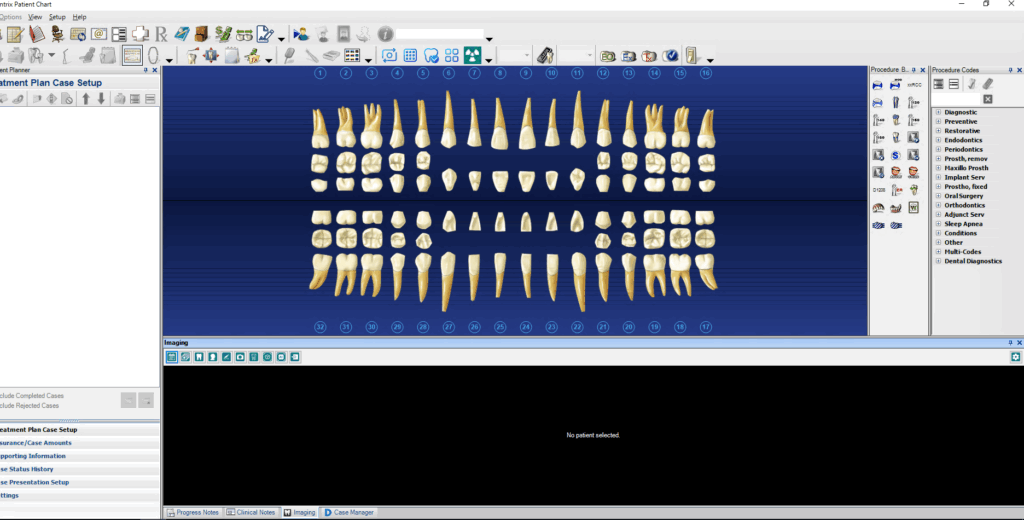
5) Do we have a resolution?
1. Yes, we do. Outlined in our action plan below
Action Plan:
Dentrix Update Current Status:
- SDA/JDA/WVD/TVD – Your Dentrix updater software has been disabled, this was done in order to prevent premature upgrade to version 26.2
- SDA: Current Dentrix Version 26.1
- JDA: Current Dentrix Version 25.25
- TVD: Current Dentrix Version 26.1
- WVD: Current Dentrix Version 26.1
- ECD: Current Dentrix Version 26.2 (Status Complete)
- Education and Preparation: (Please Printer and share these linked materials with your clinical staff.)
- Dentrix Auto Updates current disabled, however we cannot keep our updates at a perpetual standstill. We must move fwd while still keeping our operations intact. Therefore I have attached several Articles, and Informational links as to what the changes are, and how to use the new methods.
- New Dentrix Imaging Workflow FAQ – https://henryscheinone.my.site.com/dentrix/s/article/New-Dentrix-Imaging-Workflow-FAQ
- How To Attach An Electronic Attachment To An Insurance Claim – https://henryscheinone.my.site.com/dentrix/s/article/26194
- Access Dexis Through Dentrix Imaging – https://whatsnew.dentrix.com/blog/2026/02/23/access-dexis-through-dentrix-imaging/
- Dentrix Auto Updates current disabled, however we cannot keep our updates at a perpetual standstill. We must move fwd while still keeping our operations intact. Therefore I have attached several Articles, and Informational links as to what the changes are, and how to use the new methods.
- EVENTS TIMELINE:
- Current – TBD: I would like if everyone to have reviewed and confirm the materials listed above.
- TBD – TBD – JDA/SDA Manual Upgrade to Dentrix 2.6* depending on release.
- Server, and Computers Updated to latest version.
- Dexis premium integrator installed
- Charts configured with new Dexis Bridge (See Line 2. iii above)
- Dentrix Updater Software re-enabled
- TBD – TBD- WVD/TVD Manual Upgrade to Dentrix 2.6* depending on release.
- Server, and Computers Updated to latest version.
- Dexis premium integrator installed
- Charts configured with new Dexis Bridge (See Line 2. iii above)
- Dentrix Updater Software re-enabled
- Post Update – Ongoing
- Review Materials, and Provide assistance where and when necessary
- Test software, and reliability
- Verify All staff is aware and understands what is changing